Channel Overview
One agent. Twelve channels. Shared memory across all of them.
AI Butler isn’t 12 separate bots that happen to live in your messaging apps — it’s a single agent runtime with a single memory store that exposes itself through 12 different channel adapters. When you tell it something on the web chat in the morning, ask about it from Telegram on your commute, and follow up from a terminal SSH session that evening, you’re talking to the same agent the entire time. Same memory. Same schedules. Same tool calls. Same cost tracker.
Supported channels
Section titled “Supported channels”| Channel | Status | Setup complexity | Rich media | Voice | Streaming |
|---|---|---|---|---|---|
| Web Chat | ✅ Ready | Zero config | Full | Mic input | WebSocket |
| Terminal REPL | ✅ Ready | Zero config | Text only | No | Token-by-token |
| Telegram | 🟡 Beta | Easy (BotFather) | Full | Voice messages | Edit-based |
| Slack | 🟡 Beta | Medium (App setup) | Full | Audio clips | Edit-based |
| Discord | 🟡 Beta | Medium (Dev portal) | Full | Voice messages | Edit-based |
| 🟡 Beta | Complex (Meta Cloud API) | Full | Voice messages | Edit-based | |
| Microsoft Teams | 🟡 Beta | Medium (Bot Framework) | Adaptive Cards | No | No |
| Google Chat | 🟡 Beta | Medium (Service account) | Cards v2 | No | No |
| LINE | 🟡 Beta | Medium (Messaging API) | Flex Messages | No | No |
| IRC | 🟡 Beta | Easy (server/channel) | Text only | No | No |
| Custom Webhook | 🟡 Beta | Easy (HTTP endpoint) | JSON | No | No |
| Nostr | 🟡 Beta | Easy (relay + key) | Text only | No | No |
The core idea: one memory, everywhere
Section titled “The core idea: one memory, everywhere”This is the feature that matters. There’s no state to sync, no per-channel contexts to configure, no separate conversations per platform: memory is global, channels are just transport.
The proof, in two conversations
Section titled “The proof, in two conversations”On your laptop, in the web chat, you teach the agent about yourself:
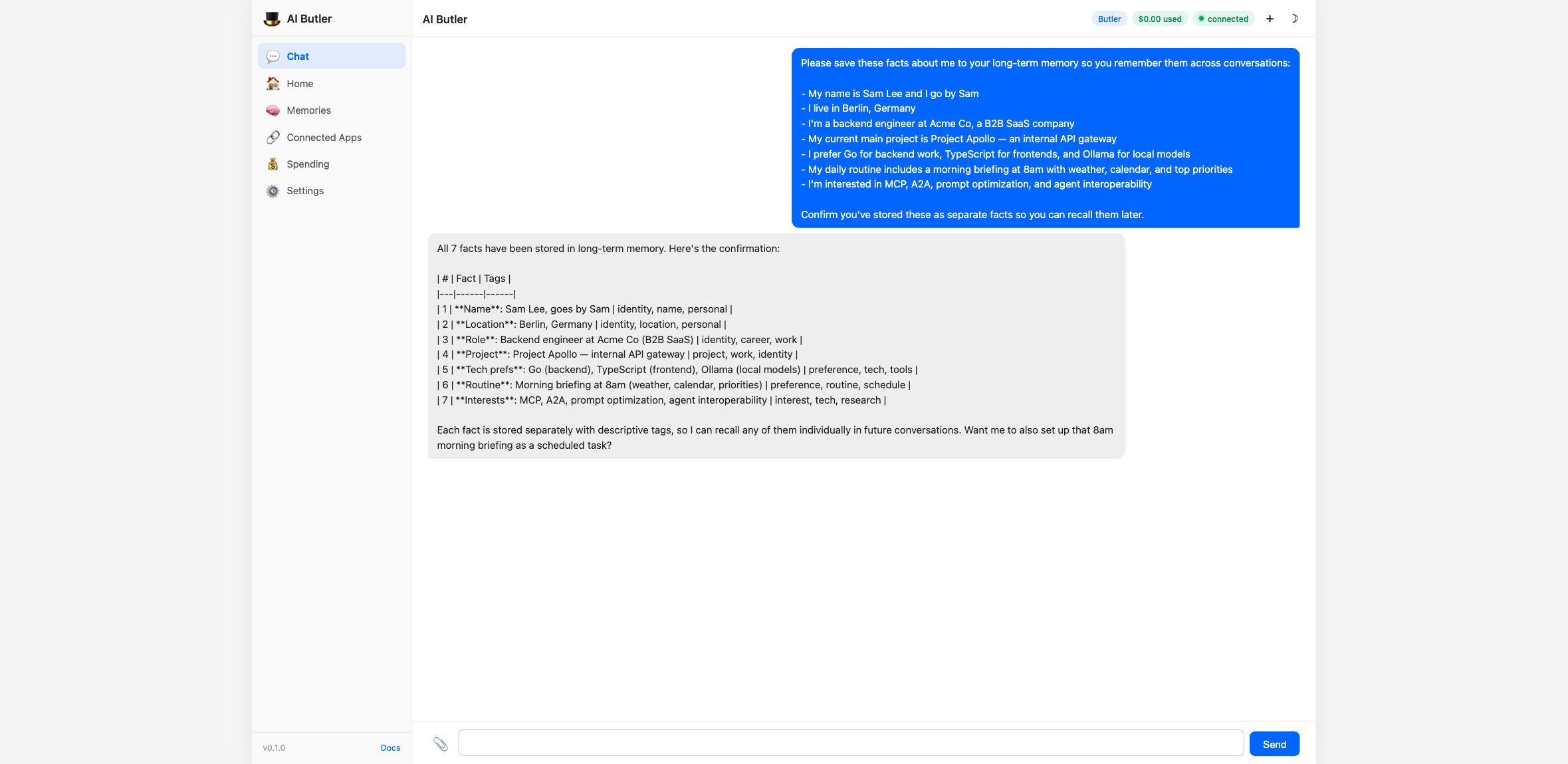
Later, from a completely different session — maybe a new browser tab, maybe Telegram on your phone, maybe a terminal REPL — you ask what the agent remembers about you:
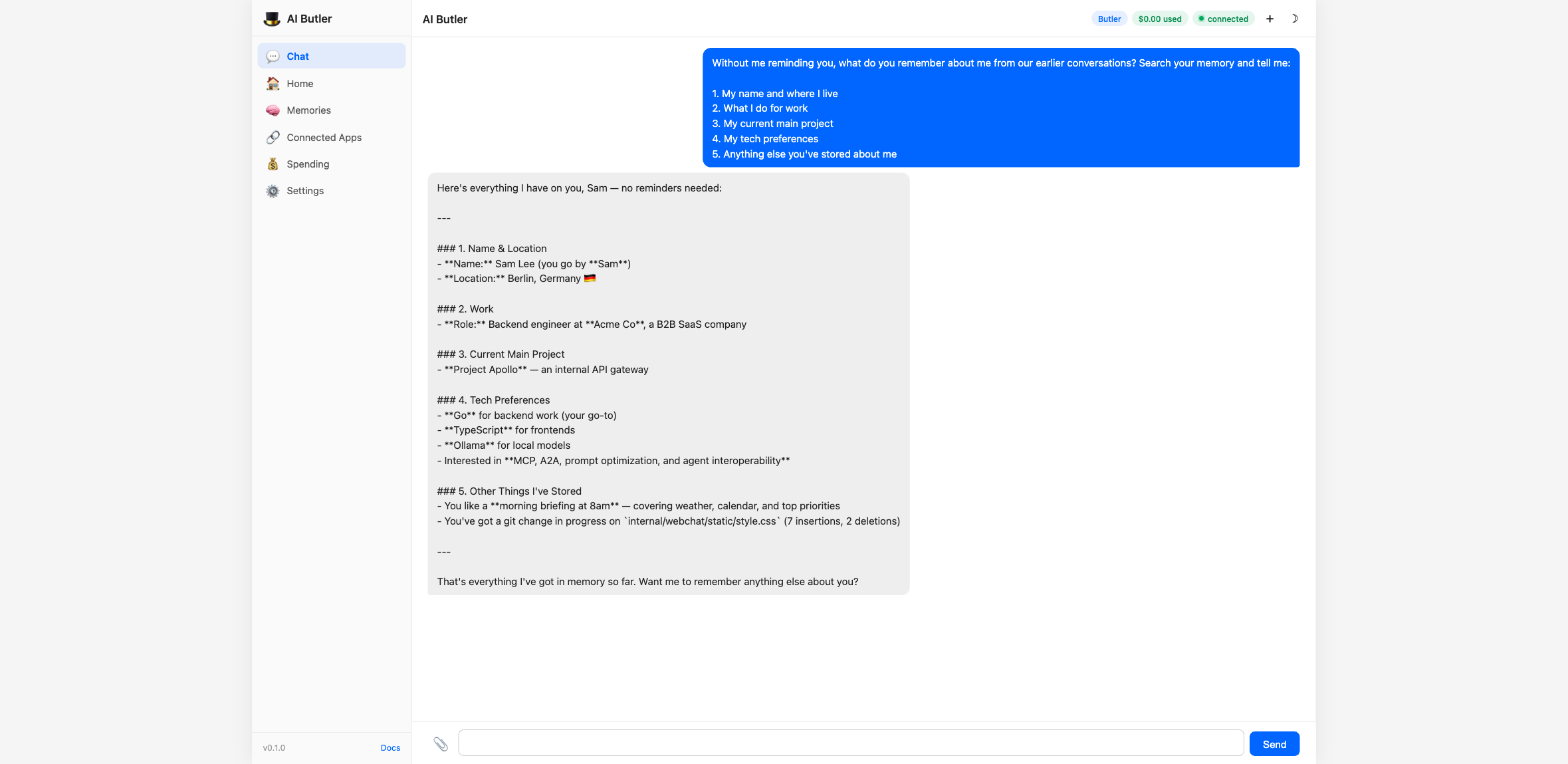
No context was carried over between the two sessions. The second chat is a brand-new WebSocket, with a brand-new session ID, and no prior messages. The agent reconstructed everything from the local SQLite store via memory.search. If you had sent the first message from Telegram and the second from the terminal REPL, the result would be identical — because memory lives in the database, not in any particular channel.
This is what “one agent, everywhere” means in practice. Every channel is a thin adapter that speaks its platform’s protocol; the agent and its memory are the same across all of them.
How a message flows through
Section titled “How a message flows through”Each channel follows the same five-step pipeline:
User types on the platform │ ▼ Channel adapter receives it (Telegram long-poll, Slack event, Discord gateway, etc.) │ ▼ Adapter wraps it as a channel.Envelope { ID, Channel, AccountID, Text, Type, Attachments, Timestamp } │ ▼ Router dispatches the envelope to the agent pipeline │ ▼ Agent processes: capability check → tool calls → memory retrieval → model response │ ▼ Response returns through the same adapter (chat.send, bot.sendMessage, gateway.reply, etc.)The Envelope format is the single interface every channel implements. Once a message is in an envelope, the rest of the pipeline (memory, tools, capability gating, audit trail) doesn’t know or care which channel it came from. This is why adding a new channel is additive work — you don’t have to teach every feature about the new channel, just write an adapter that produces envelopes.
Cross-channel relay
Section titled “Cross-channel relay”Because channels are first-class, the agent can route messages between them:
You (on Telegram): Send Sarah a message on WhatsApp saying I’ll be 20 minutes late
Butler: Sent to Sarah on WhatsApp: “Hi Sarah, quick heads up — I’ll be about 20 minutes late. See you soon.”
Under the hood the agent calls the channel.relay tool. The tool:
- Looks up “Sarah” in the
contactstable to find her preferred channel and identifier - Calls the WhatsApp channel’s
send()method via the channel registry - Returns the delivery status back to the originating Telegram thread
Requirements: both channels need to be active, and the recipient needs to be in your contacts. Contact management is a separate feature — see Memory (contacts live in the same SQLite store as everything else).
Running multiple channels
Section titled “Running multiple channels”Activate a channel by listing it in settings.active_channels:
settings: active_channels: - webchat # always available, zero config - terminal # always available, zero config - telegram # beta — needs telegram_bot_token in vault - slack # beta — needs slack_bot_token + slack_app_token - discord # beta — needs discord_bot_tokenThen ./aibutler run will start each adapter in a goroutine on boot. Each adapter’s startup is independent — if Telegram credentials are missing, the other channels still run and a warning logs the missing vault key.
Adding a channel
Section titled “Adding a channel”Every channel follows the same pattern:
- Get credentials from the platform (bot token, app key, webhook URL, etc.)
- Store in the vault:
aibutler vault set <key> <value> - Add to
active_channelsinconfig.yaml - Restart AI Butler
Individual channel guides walk through each step with the exact credential names and platform UIs:
Web Chat → Zero config, full visual tour of the 7-panel sidebar
Terminal REPL → Streaming REPL with slash commands
Telegram → BotFather token, long-polling, voice messages, Markdown
Slack → Bolt SDK, Socket Mode, channel + DM support
Discord → Gateway connection, voice + text, slash commands
WhatsApp → Meta Cloud API, business-tier requirements
Microsoft Teams → Bot Framework, Adaptive Cards
Google Chat → Service account auth, Cards v2
LINE → Messaging API, Flex Messages
IRC → Classic protocol, Libera/OFTC
Custom Webhook → Wrap any HTTP platform as a channel
Nostr → Decentralized, NIP-04 DMs
Why not Matrix / XMPP / Signal?
Section titled “Why not Matrix / XMPP / Signal?”We’d love these. They’re not wired up yet because:
- Matrix — E2EE is the hard part, and getting Olm/Megolm right without a Go SDK is a lot of work. On the roadmap for a future release.
- XMPP — smaller modern user base; lower priority. Community contributions welcome.
- Signal — no official bot API. The unofficial signal-cli bridge works but adds a large external dependency. Deferred.
If any of these are critical for you, open an issue and tell us which — the order of implementation follows demand.
Related
Section titled “Related”- Web Chat — full feature tour — one of the two
readychannels (the Terminal REPL is the other) - Memory & Knowledge — the shared memory store that makes cross-channel identity work
- Quick Start — see memory + channels working together live